Memory Categories
PowerMemory doesn't store memories as one flat pile. Every memory belongs to a category and carries a priority. Together they decide what surfaces — and in what order — when you inject context into a new AI conversation.
This is the difference between "my AI remembers some stuff" and operational memory you can actually steer.
Priority tiers
Each memory is tagged P0–P3:
| Priority | Meaning | Surfaces |
|---|---|---|
| P0 | Critical — defines how your AI must behave | Always, first |
| P1 | Important — active context you rely on | Almost always |
| P2 | Useful — good to have when relevant | When space allows |
| P3 | Background — nice but non-essential | Last, if room |
When you inject memory into a fresh chat, P0 items lead. If the context budget is tight, P3 items are the first to drop.
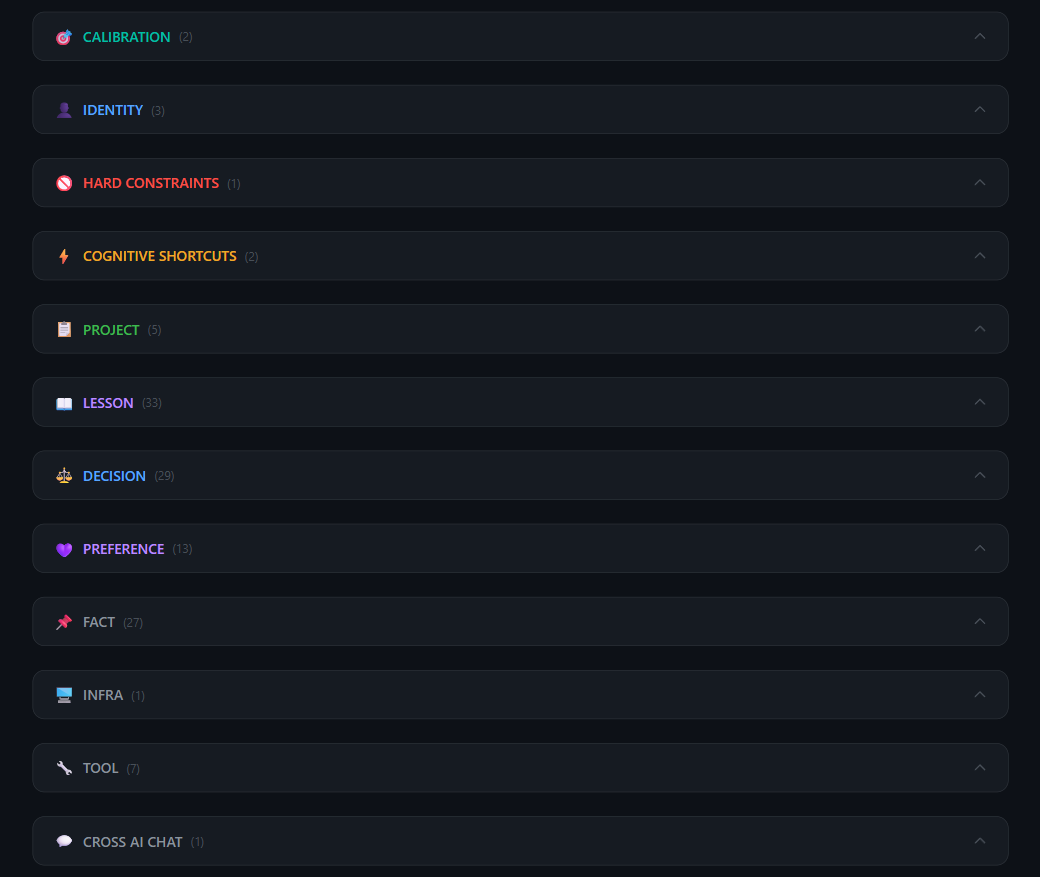
The 13 categories
🎯 CALIBRATION
How your AI should communicate and collaborate with you.
- Use it for: tone, format, verbosity, language, feedback style.
- Avoid: one-off requests ("be brief just this once") — those aren't durable.
- Good: "Always give cold, direct feedback. No filler praise."
- Don't save: "Make this email shorter." (a task, not calibration)
- Priority: usually P0 — it shapes every interaction.
👤 IDENTITY
Who you are and the context you operate from.
- Use it for: your role, background, what you're building, your working context.
- Avoid: transient states ("I'm tired today").
- Good: "Solo founder running a SaaS + two service businesses."
- Don't save: "Currently on a call." (temporary)
- Priority: P0–P1.
🚫 HARD_CONSTRAINTS
Non-negotiable rules your AI must never violate.
- Use it for: absolute boundaries, safety rails, forbidden actions.
- Avoid: soft preferences (those go in PREFERENCE).
- Good: "Never modify production before verifying a backup exists."
- Don't save: "I prefer dark mode." (preference, not constraint)
- Priority: P0 — must always surface.
⚡ COGNITIVE_SHORTCUTS
Your decision heuristics and mental models.
- Use it for: how you reason, rules of thumb, default trade-offs.
- Avoid: one-time decisions (those go in DECISION).
- Good: "Prefer empirical verification over assumption before acting."
- Don't save: "Chose option B for this task." (a decision)
- Priority: P1.
📋 PROJECT
Active work and its current state across sessions.
- Use it for: what you're working on right now, where it stands.
- Avoid: finished projects with no ongoing relevance.
- Good: "Building v0.9 browser extension; OAuth flow done, UI pending."
- Don't save: "Thinking about maybe starting something." (not concrete)
- Priority: P1.
📘 LESSON
What you learned — so it's never re-learned.
- Use it for: what worked, what failed, what to never repeat.
- Avoid: restating obvious facts.
- Good: "A flag emitted is not a flag acted-on — test the downstream action too."
- Don't save: "Code can have bugs." (too generic)
- Priority: P1.
⚖️ DECISION
What you chose, why, and what was rejected.
- Use it for: concrete choices + the reasoning + the discarded alternative.
- Avoid: heuristics (those go in COGNITIVE_SHORTCUTS).
- Good: "Chose MkDocs over Docusaurus — lower maintenance for a solo founder."
- Don't save: "I usually prefer simple tools." (a heuristic)
- Priority: P1–P2.
💜 PREFERENCE
Your soft preferences — style, tools, defaults.
- Use it for: likes/dislikes that aren't hard rules.
- Avoid: absolute requirements (those go in HARD_CONSTRAINTS).
- Good: "Prefer concise responses with decision markers."
- Don't save: "Never send data to third parties." (a constraint)
- Priority: P2.
📌 FACT
Stable facts about you, your environment, your stack.
- Use it for: durable reference data that rarely changes.
- Avoid: fast-changing values.
- Good: "Primary domain is example.com; backend runs FastAPI."
- Don't save: "Server load is 40% right now." (volatile)
- Priority: P2.
🖥️ INFRA
Your servers, machines, networks, deployments.
- Use it for: hosts, IPs, deploy targets, hardware specs.
- Avoid: temporary connection details.
- Good: "Production VPS on Contabo; Caddy + FastAPI, static docs at /docs/."
- Don't save: "SSH session open right now." (transient)
- Priority: P2.
🔧 TOOL
Tools you use, their configs, and your patterns.
- Use it for: tooling setup, commands, working patterns.
- Avoid: one-off command runs.
- Good: "Deploy docs via scp to /opt/.../static/docs/ after strict build."
- Don't save: "Ran ls once." (not a durable pattern)
- Priority: P2.
💬 CROSS_AI_CHAT
Notable conversations with AI models worth preserving.
- Use it for: key handoffs, important cross-model exchanges, decisions reached with another AI.
- Avoid: routine chat noise.
- Good: "Cross-AI audit with ChatGPT flagged a legal wording risk on the landing page."
- Don't save: "Asked an AI a quick question." (no lasting value)
- Priority: P3.
💻 CROSS_AI_CODING
Coding handoffs between AI agents and sessions.
- Use it for: a short pointer note when passing coding work between agents (e.g. Claude Code → Codex) — repo and branch, the commit, files touched, what's done, what's next, and any traps.
- Avoid: pasting code, diffs, or secrets — save a pointer, not the payload.
- Good: "auth-service @ branch feat/oauth, commit a1b2c3d — token refresh done, rate-limiting next; re-check against Git before trusting."
- Don't save: file contents, or "fixed a bug" with no repo/commit to anchor it.
- Priority: P2–P3.
What not to save (any category)
PowerMemory works best when the vault stays signal-rich. Skip:
- Temporary states ("on a call", "tired today")
- One-off tasks ("shorten this paragraph")
- Generic facts everyone knows
- Sensitive secrets (passwords, full keys, card numbers)
Advanced: how surfacing works
When you inject memory, PowerMemory ranks candidates by priority tier first, then by recency and relevance. A lightweight contradiction check flags when a new memory conflicts with an existing one (state update vs. genuine contradiction), so your vault stays consistent over time. Technical details live in the Privacy & Security Reference.